Build an editable explainer with purposeful motion

A good explainer gives every movement a job. A packet traveling between two services shows a relationship. Bars arriving one at a time establish a comparison. A short outline draws attention to a result that is already visible. Those are different communication tasks, and combining them deliberately makes an animation easier to revise and easier to watch.
The pinned Scribe Animator source reviewed for this guide includes native Desktop agent recipes for request flows, comparison bars, metric reveals, device showcases, and kinetic titles. Their outputs remain ordinary editable objects and timing. You can revise the wording, placement, connectors, or motion instead of rebuilding a flattened video whenever the story changes.
Try the downloadable API-login example below to see a native timing revision in the actual editor. Creating another scene through a recipe requires the corresponding agent capabilities in your Desktop session.
Choose the right creation surface with Mobile Lite, Desktop Studio, and agent-assisted authoring. The advanced creation workflows here use Desktop; native playback and the manual controls available after import are separate checks.
The capability contracts and source tests behind this article were reviewed on
7 October 2026 at source revision 6c7c53b5. The API example adds actual
deployed Desktop import, frame inspection, native key editing, local restore,
and export captures from 8 October 2026. The deployment commit was not verified.
This does not establish a new live recipe-creation session, all five recipes in
that deployment, universal client support, or a video export.
Start with the settled scene
Before asking for animation, make the final arrangement readable. Put the main claim where the audience can find it, use native text for labels, and separate visuals that need independent changes. A comparison needs a common scale; a process needs clear endpoints; a title needs enough space for its longest line. Motion cannot repair an unexplained unit or a cramped sentence.
For repeated cards or an ordered process, Flow and Grid can arrange eligible objects by their visual bounds. These actions place the base geometry once. They are useful for assembly, but they are not a responsive constraint system that continually rearranges the scene. An Anchor Binding serves another purpose: it keeps a label's placement related to its source visual. Read the selection and arrangement guide before combining these relationships with animated position keys.
Choose one semantic recipe
Consider an API explanation with a client card on the left and a service card on the right. Create and inspect those endpoints first. Then use Request Flow for one packet, its connector, optional label, and editable native position keys. Check the lead-in, departure, arrival, and reading hold. If the response is a second event, add it after the first flow is clear rather than creating a swarm of decorative particles.
For a categorical comparison, Comparison Bars creates a small set of horizontal bars and native labels. Supply the actual values, unit, maximum, and meaning of “better.” The recipe does not fetch evidence or decide whether higher or lower is preferable. Its final hold gives viewers time to compare the settled chart. For one proof point, Metric Reveal may be enough: a native value, a meaning label, optional supporting copy, and a card or bare treatment.
A Device Showcase frames an existing eligible visual inside a browser or phone viewport. The content can pan within that hard-edged clip while remaining editable. This communicates an interface or product detail without claiming to be a live webpage or screen-recording engine. A Kinetic Title brings logical word runs into one native Text object. Use it for the headline, then let the headline settle while the audience reads the evidence.
The editable motion guide describes all five recipes, required inputs, scene-local timing, and their current boundaries. The agent should discover the current schema, retain returned IDs, and inspect the expanded native result after each action.
Try it: give a login request more travel time
Download the original API login project and open it with File → Import .scribe. It has four nine-second scenes at 1920 × 1080. Select 01 A login request and compare its packet at 1.800, 3.000, and 3.850 seconds before revising anything.
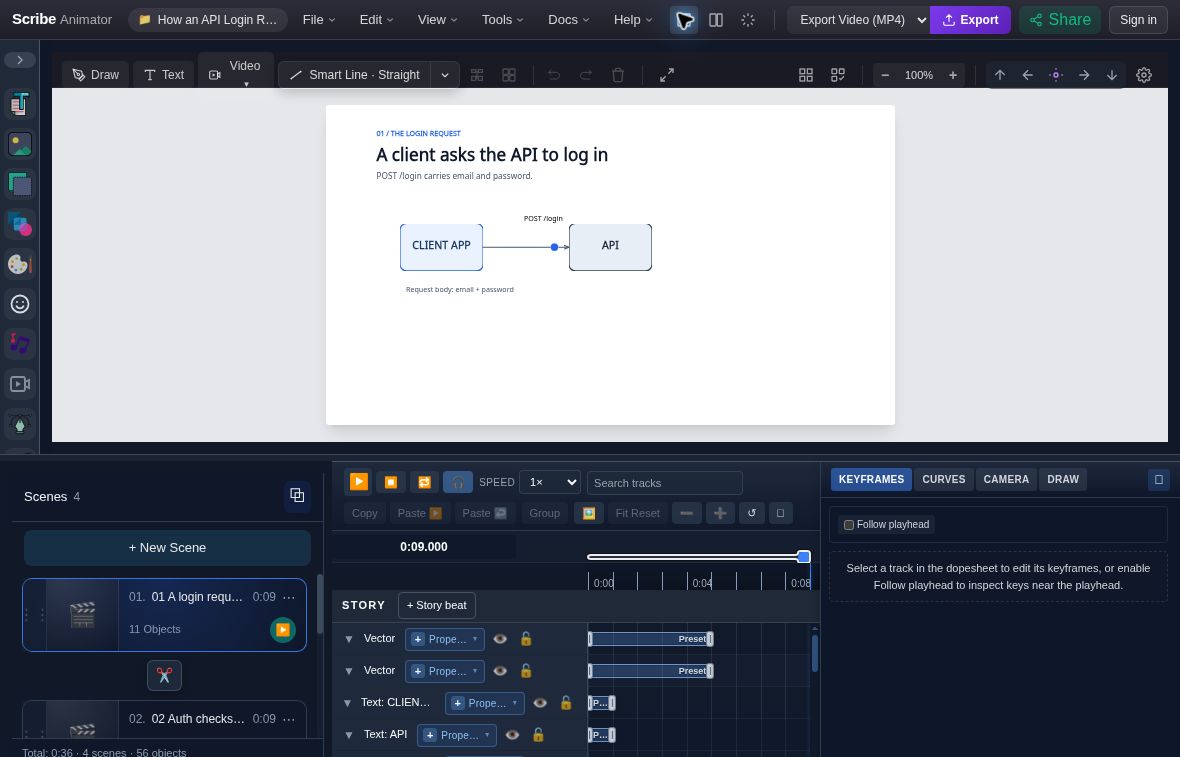
Search Position.X, select the packet's property track, and inspect its native keys: 1.800 s / X 550, 2.150 s / X 550, and 3.850 s / X 757. In KEYFRAMES, change the last Time to 4.2 and press Enter, leaving the endpoint at X 757. The packet gets 350 ms more travel time; the diagram and its wording remain independently editable.
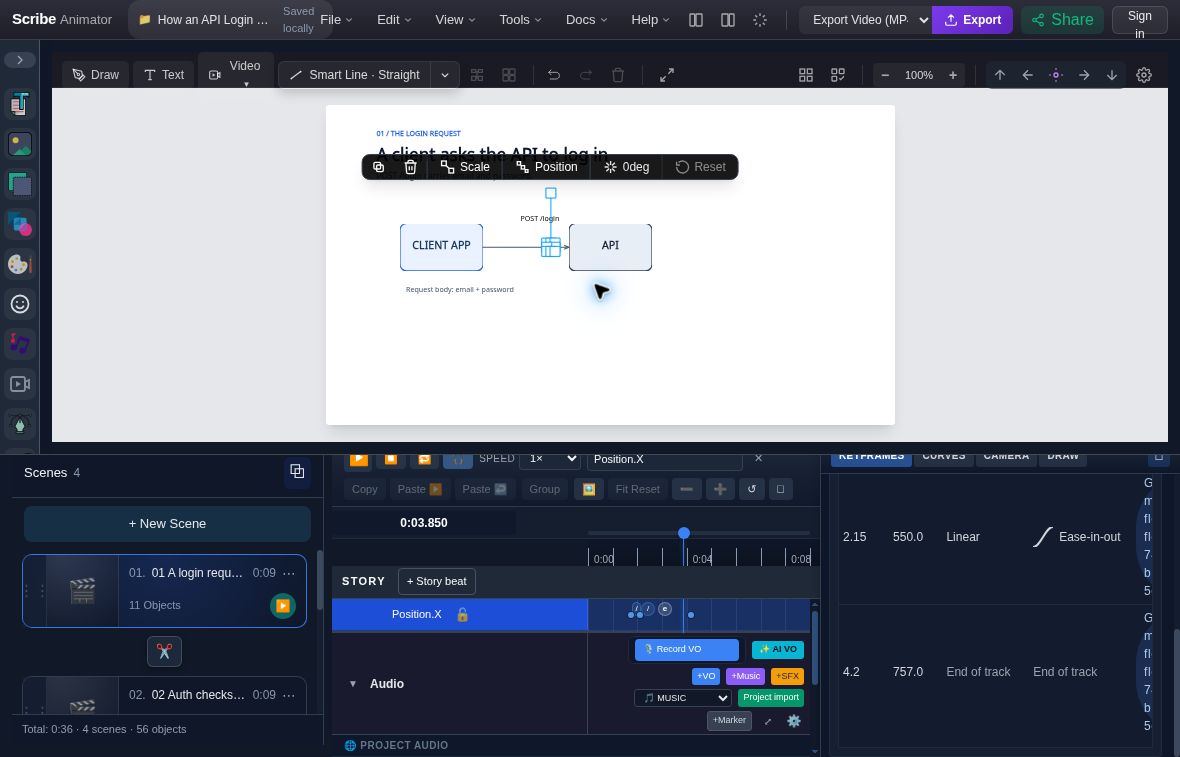
The edit capture still has a 3.850-second playhead. Its visible final row confirms the 4.200-second key, rather than showing the new arrival frame. Seek to 4.200 seconds and review transit and the reading hold in your own project.
Use File → Save Locally, reload, and Restore to check the change. The actual revised native project retains the three keys with the later arrival. The full walkthrough includes event-frame captures, exact steps, checksums, and recovery advice.
Keep the motion owners clear
An entrance, a journey, a drawing reveal, and an attention cue may affect the same object at different times. Their owners still matter. Path Follow owns a follower's evaluated position and optional rotation. Anchor Binding owns a dependent label's X/Y placement. Scene Pose supplies placement for a shared identity in a particular scene. Adding competing transform keys can be rejected or create a different result from the one you intended.
When the editor reports a conflict, inspect and revise that owner. A semantic recipe is a useful starting point, not an exemption from the editor's timing rules. A baked spring, for example, becomes ordinary editable transform keys; it does not add a permanent physics engine. Use it for one intentional settling movement after checking the existing preset or binding.
The shared timeline keeps precise edits accessible after semantic assembly. Sequence, parallel, and stagger composition can move eligible existing Draw Steps and contiguous property-key ranges while preserving their durations. They do not stretch the whole scene or automatically retime audio. Read back the new ranges, keep synchronized members together, and leave enough time after the last event for the takeaway. The timeline guide explains composition and ownership in more detail.
Direct attention after the entrance
Use an indication when the viewer should notice something already present. Emphasize pulses scale and restores it; Wiggle makes a small rotation cue; Circumscribe draws a temporary outline; Trace Highlight sweeps a translucent stroke across a target. The strongest cue is often one well-timed cue followed by a quiet hold.
Review the state after the cue ends. The original size or angle should return, and a temporary annotation should hide. A correct peak frame is not enough if the next sentence inherits a leftover outline. If you retime an annotation, keep its reveal and lifetime together.
Review exact frames and real playback
Composition diagnostics can report evaluated bounds, spacing, and occupancy proxies at one scene-local timestamp. These geometric signals help locate a potential collision; they do not read the message or judge painted pixels. The bounded query can also reject a scene outside its supported scope. Record that result and keep the authored content intact.
Use the exact-frame preview for visual judgment. Inspect before, during, and after each entrance, packet travel, crop, camera transition, cue, and hide boundary. Read the frame itself rather than accepting successful metadata as proof. Then play the whole scene for rhythm. A sequence that is readable when paused can still move too quickly in context.
Save and reopen a .scribe package for editable handoff. Inspect an actual MP4
when video is the delivery target. Public SVG export is unavailable, and a
package, frame preview, and video each prove a different part of the result.
Questions before the next revision
Can I edit the generated result manually? Yes: the recipes create native objects and supported relationships/timing. Keep their owning contracts in mind when changing a bound property.
Does this establish mobile authoring parity? No. The recipe authoring capabilities reviewed here declare Desktop support. Read the platform guide for the surface you actually use.
Should every scene use all five recipes? Choose by meaning. A single clear process or proof point is often enough. For a supplied reference, use the reference reconstruction workflow and compare the result against that reference explicitly.
Continue with keyframe editing when a precise lower-level revision is the next step, or the Director workflow for a complete plan, creation, critique, revision, and evidence report.