Author editable motion with agents
Motion recipes assemble a small visual explanation from native Scribe objects and timing. A request packet, comparison chart, metric card, device frame, or kinetic title remains editable after creation. Use a recipe when its meaning fits the story; use lower-level object, keyframe, drawing, and camera commands for a precise revision.
The motion recipe capabilities in this guide are Desktop-only, and the current UI has no motion recipe picker. Their native results can be revised through the text, transform, and timeline controls exposed by the receiving workspace. Playback support does not certify every property editor or a phone export. Compare Mobile Lite, Desktop Studio, and agent-assisted authoring.
Before you start
- Open the intended project and scene in Desktop. Save a local checkpoint or
export a
.scriberecovery copy. - Use the Site tools quickstart to discover the
broker. Search with
scribe_search_capabilities, inspect each action withscribe_get_capability, and callscribe_execute_capabilitywith itscapabilityIdandinput. - Read the scene ID, duration, project dimensions, object IDs, and project revision. Use the returned IDs; display names are not identifiers.
- Plan the settled frame and the time the audience needs to read it. A motion recipe does not supply evidence for your metric or write your narration.
- Inspect locks and timing ownership before changing an existing object.
Times in these contracts are scene-local milliseconds. A start time of 1000 means one second into that scene, regardless of its project start. Retrieve the live schema for every optional field; it is the authority when examples differ.
Choose the recipe by its communication job
| Capability | Creates or changes | Required intent | Important boundary |
|---|---|---|---|
motion.request_flow | Attached connector, traveling packet, optional native label, and native position keys | Existing source/target IDs, scene, start, travel duration | One scene-local flow; endpoint clearance and readable arrival hold matter |
motion.comparison_bars | Native title, category/value labels, horizontal bars, and staggered entrances | Title, 2–10 items, positive scale maximum, scene, start | Nonnegative categorical values; no live data feed or numerical counter |
motion.metric_reveal | Native value/label text, optional supporting text and card | Value string, meaning label, scene, start | The supplied value is static text; retain a readable final hold |
motion.device_showcase | Browser or phone frame and hard-edge Clip Binding for an existing visual | Scene and eligible content object ID | Optional upward content pan moves content; it is not a camera move or live website |
motion.kinetic_title | One native Text object with word/run entrances | Single-line text, scene, start | Logical word runs stay in one editable text object |
The separate motion.spring_bake helper writes bounded editable transform keys
for an existing object. It is useful for a settling movement after the composition
already exists.
Worked example: revise an API login request
Start with the original API login project (.scribe). It is a 1920 × 1080 project with four scenes, 36 seconds overall, and 56 objects. You can follow this manual revision without a connected agent. The cards, native labels, attached connector, packet, and native Position keys are already authored.
Open and inspect the original motion
- Save your current project, then choose File → Import .scribe and select the downloaded source.
- Select the first scene, 01 A login request. Its duration is nine seconds.
- Seek to 9.000 seconds to inspect the completed explanation, then compare 1.800, 3.000, and 3.850 seconds for departure, transit, and arrival.
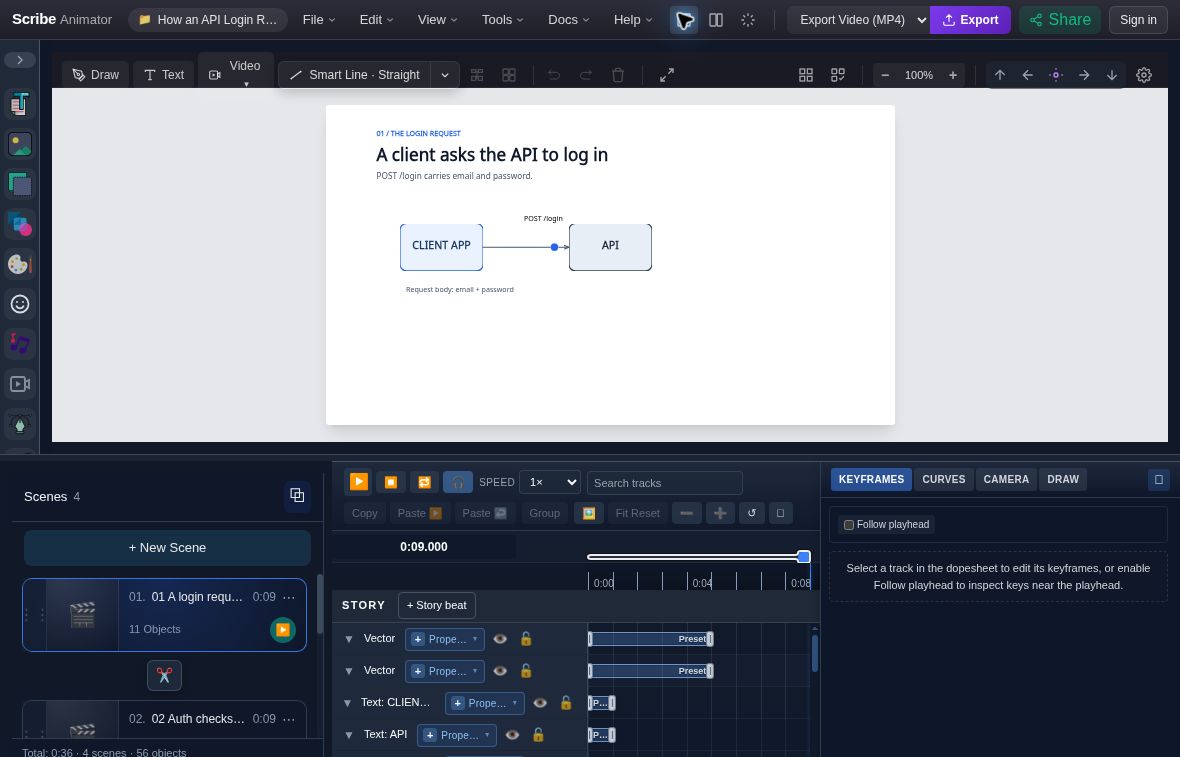
- Request relationshipThe packet and connector sit between independently editable endpoint cards.
- Scene-local playheadThe readout is 0:09.000 in the selected first scene.
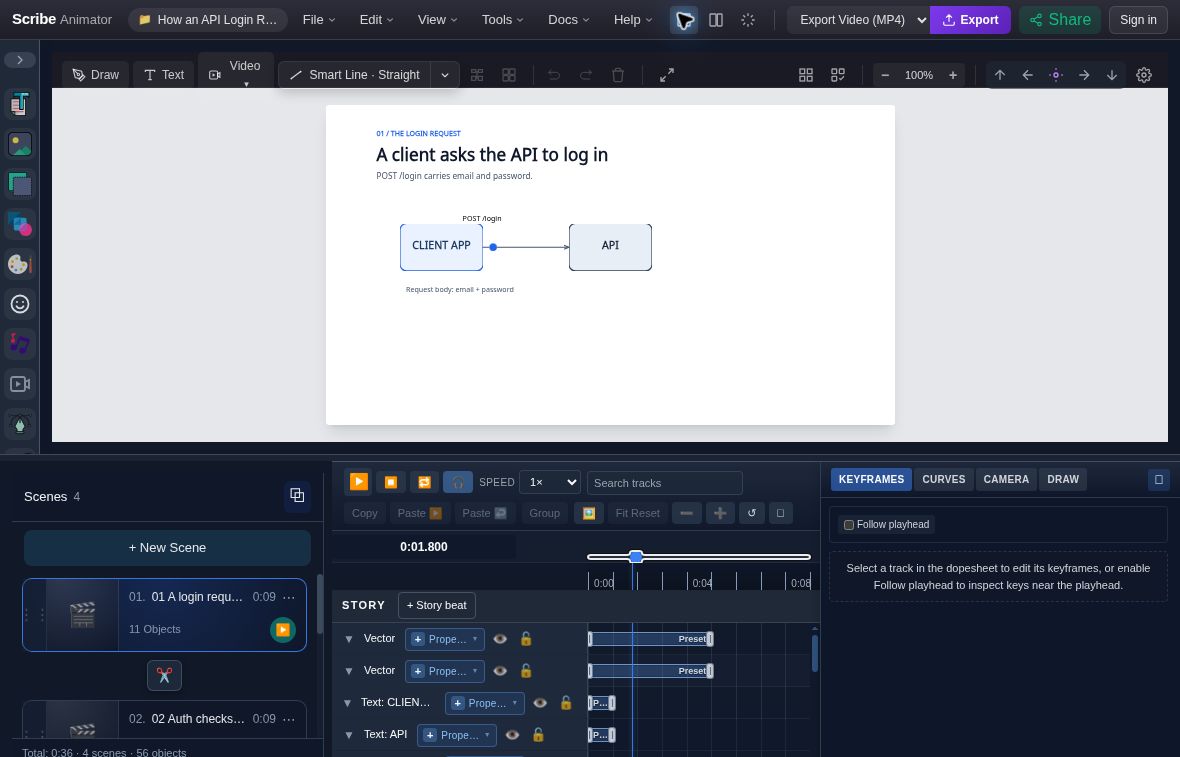
- PacketThe packet is at its departure position before the lead-in hold ends.
- TimestampThe timeline readout identifies this 1.800-second frame.
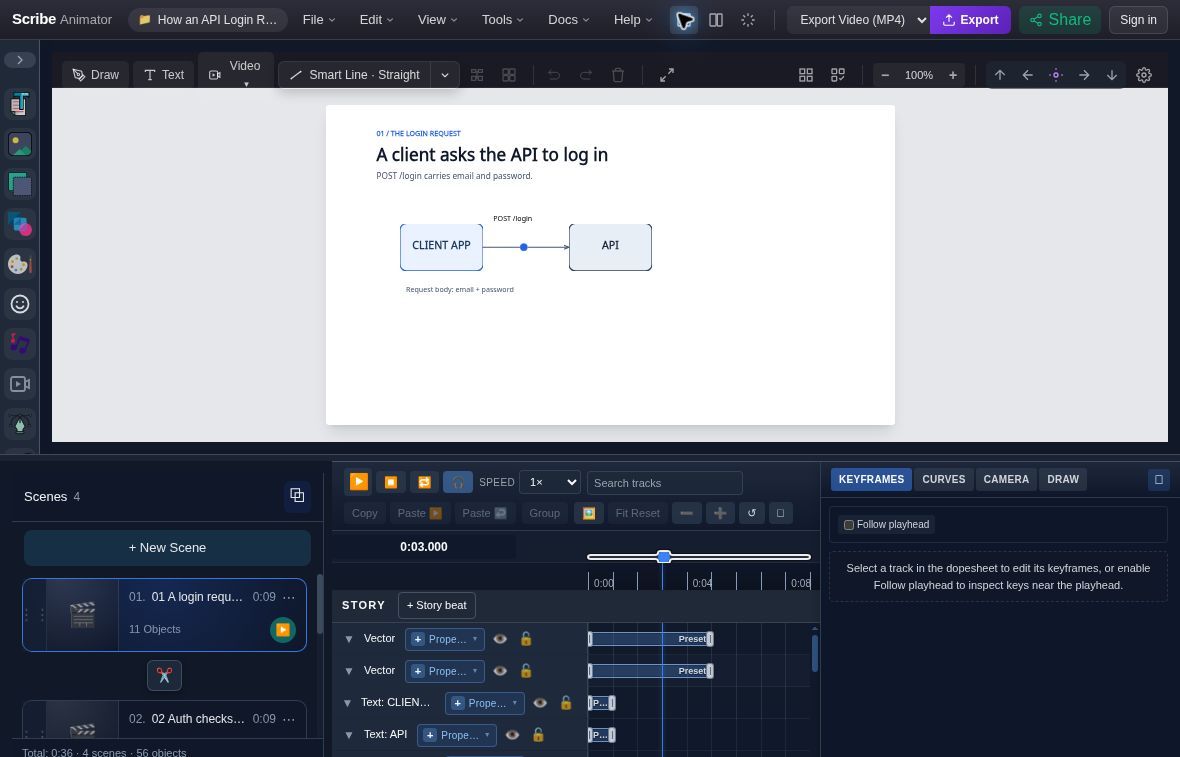
- PacketThe packet is between the endpoints during the original travel segment.
- TimestampThe timeline readout identifies this 3.000-second frame.
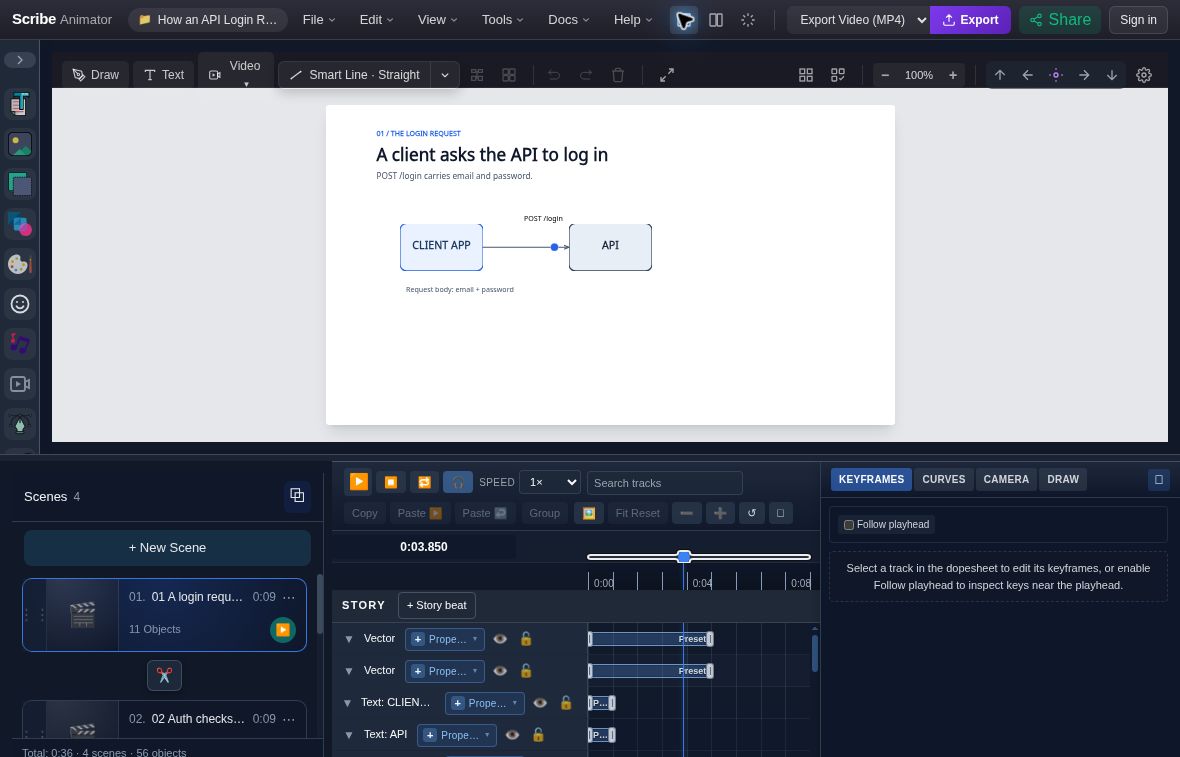
- PacketThe original packet has reached the API side at the final Position.X key.
- TimestampThe timeline readout identifies this 3.850-second frame.
Delay arrival without changing the endpoint
-
Enter Position.X in Search tracks, then select the packet's property row. Searching only for the object name can hide this child track.
-
Inspect its three keys in KEYFRAMES:
Scene-local time X value Meaning 1.800 s 550 Appear at the departure position 2.150 s 550 End the lead-in hold; the next segment uses ease-in-out 3.850 s 757 Arrive at the API side -
Change the final Time from 3.85 to 4.2 and press Enter. Keep its value at 757. This lengthens travel by 350 ms without moving the endpoint.
-
Seek to 4.200 seconds to inspect the revised arrival, and review transit and the final hold again. The supplied edit screenshot remains at 3.850 seconds.
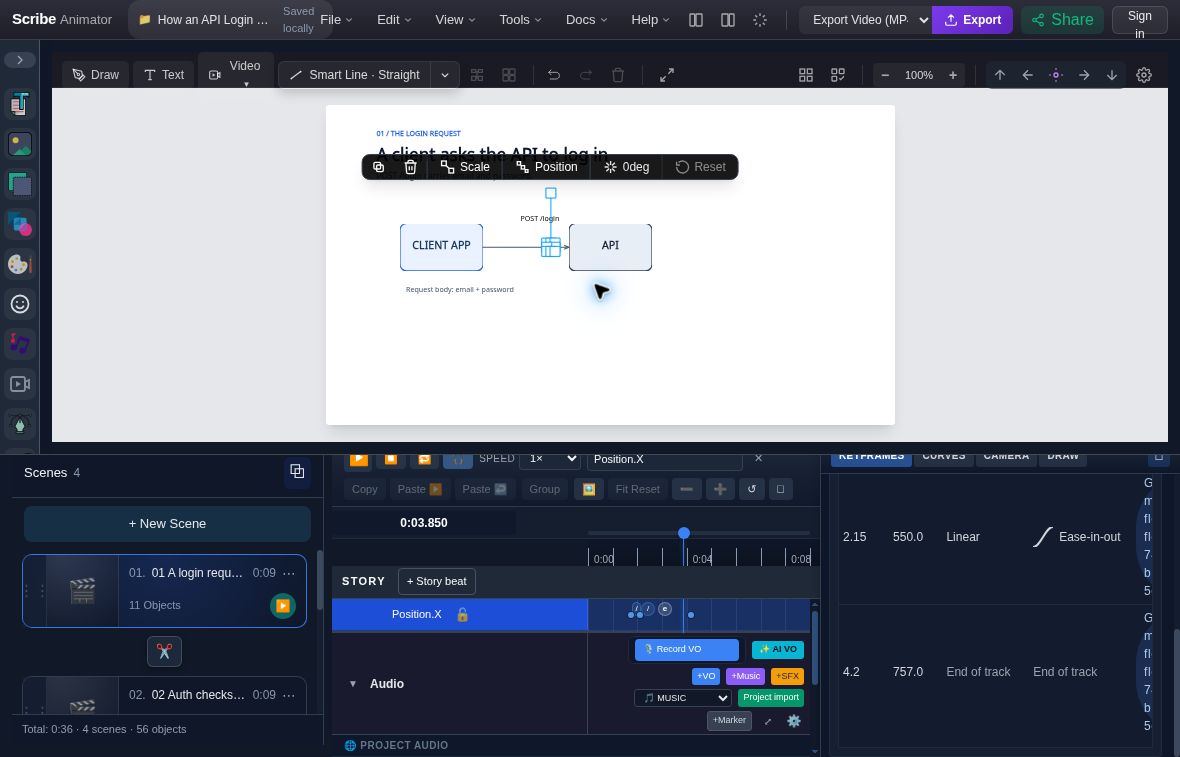
- Revised arrival keyThe visible last row contains Time 4.2 and Value 757. Earlier table rows are above the visible area.
- Current playheadThe scene is paused at 0:03.850 while the later key is being inspected.
- Position.X filterSearch the property name so its child track stays visible.
Save and reopen the revision
Choose File → Save Locally, reload, and choose Restore. Search Position.X again and confirm keys at 1.800, 2.150, and 4.200 seconds. Then choose File → Export .scribe for a portable copy. The actual revised project (.scribe) contains the saved 4.200-second arrival; import it to compare with the source. Download checksums identify both files.
The actual Desktop captures on 8 October 2026 verify import, selected event frames, the native key edit, local save/restore, and native export. They do not establish a fresh agent creation session, a full 36-second playback review, or a video export. The deployed bundle was observed; its repository commit was not verified.
Tutorial: create a request flow with an agent
1. Build the endpoints first
Create two readable cards with native labels and leave space for the connector. Use Flow or Grid layout when its eligibility rules fit. Layout places base geometry once; moving a card later does not rerun the layout automatically.
Inspect the actual endpoints and their IDs. A recurring label that must follow a card can use Anchor Binding. Keep object placement separate from packet travel.
2. Create one flow
Replace the three IDs below with IDs returned by the current editor. The example uses a 300 ms lead-in, 1400 ms travel, and 800 ms arrival hold:
{
  "capabilityId": "motion.request_flow",
  "input": {
    "sceneId": "scene-from-query",
    "sourceObjectId": "source-card-from-query",
    "targetObjectId": "target-card-from-query",
    "startMs": 1000,
    "leadInMs": 300,
    "travelDurationMs": 1400,
    "arrivalHoldMs": 800,
    "flowType": "request",
    "packetLabel": "Request",
    "endBehavior": "hold"
  }
}
Other flow intents are response, check, token, and data. Optional source
and target anchors are auto, top, right, bottom, left, or center.
Packet size, endpoint padding, colors, connector width, and easing are bounded
fields in the live schema. hold keeps the packet after its arrival hold;
hide ends its visible interval.
3. Inspect the expanded result
Keep the returned connector, packet, optional label, track, and key IDs. Request
Flow writes native transform.x and/or transform.y keys for the axes that move.
These appear as Position tracks in the editor. Revise the synchronized position
keys for travel timing and preserve endpoint clearance. The connector retains
its endpoint attachments, and the optional label follows the packet through
Anchor Binding. Canonical Path Follow is a separate route/follower workflow.
Inspect the source hold, mid-travel, arrival, and final hold. Confirm that the packet clears the card edges and that the label stays readable. Add a second response flow only after the first flow and its timing are correct.
Create a comparison, proof point, or device view
For comparison bars, give each item a distinct label and a nonnegative value no
greater than scaleMax. Choose neutral, lower-is-better, or
higher-is-better for comparisonDirection. A chart can fit the schema while
its story is misleading: verify the unit, common scale, ordering, and source of
the numbers yourself. staggerMs is start-to-start spacing, and finalHoldMs
preserves a reading interval after the final reveal.
For a metric reveal, value is a short string such as “42%”, and label explains
what it means. treatment is card or bare. Optional supporting text should
qualify the claim rather than introduce an unrelated message. Check the longest
line against the authored frame before adding motion.
For a device showcase, create and inspect the content first. Choose browser
or phone as deviceStyle. Optional contentPan supplies positive travelPx
and a durationMs; the result is editable upward content movement inside a
viewport. Inspect the initial, middle, and final crop. Do not use this action to
claim an interactive webpage or Video-on-Canvas playback inside the frame.
For a kinetic title, choose restrained-rise, scale-settle, or
directional-slide. The result remains a native Text object. Review the settled
copy first, then the overlapping run entrances and final hold. See the
text guide for live text edits,
automatic content sizing, and deliberately fixed text boxes.
Refine the native result
Clip one visual inside a shape
object.clip_binding.set takes objectId, sourceObjectId, and
mode: "inside". The source is a native rectangle, rounded rectangle, or circle;
the target is an eligible image, SVG/vector, drawing, or text leaf local to the
same scene. The geometry stays editable. One source can clip multiple independent
targets, but nested clip graphs and grouped targets are outside V1.
The source remains an ordinarily visible shape. Its visible interval must cover
the target's render interval; opacity/visibility/draw-progress tracks and
unfinished entrance owners can invalidate it. Moving the source is different
from hiding it. Use object.clip_binding.get to inspect and .clear to remove
the relationship, then recheck both objects before retrying.
Animate text runs or compatible vector geometry
text.kinetic.set, .get, and .clear control bounded word/run motion on native
Text. The binding describes start, duration, stagger, easing, and starting
offset/scale/rotation/opacity. Runs are not separate text boxes. The current
contract is bounded to 32 logical runs; review segmentation and text edits rather
than treating this as character animation for every script.
vector.morph.set references one source and a compatible target object, with
start, duration, and easing. V1 requires compatible path structure; it does not
match arbitrary illustrations or convert a raster image into morph geometry.
Inspect .get, test partial interpolation, and use .clear when the relationship
should end. Preserve the source and target identities during revision.
Add a restrained visual effect
object.effects.set, .get, and .clear apply bounded static blur, brightness,
contrast, saturation, shadow, or glow to an eligible visual leaf. Shadow and glow
use explicit color, blur, and opacity fields; shadow also has offsets. These
effects do not supply an effect timeline or a scene-wide filter. Inspect the
effect at the intended scale and inside any Clip Binding. A shadow is a visual
cue, not a change in geometry or a lighting simulation.
Bake a spring into ordinary keys
motion.spring_bake requires an object, a transform binding, start/end times,
target value, stiffness, damping, and mass. Supported bindings are
transform.x, transform.y, transform.scale, and transform.rotation.
The interval is 100–30,000 ms; maxKeys is 3–64 and defaults to 32. Optional
initial velocity uses property units per second.
The operation samples a physical intent into editable keys and ends at the exact target value. It does not add a live physics simulation. Check overshoot, scene bounds, and competing placement/scale/rotation owners. Reduce the movement or change spring parameters when the sampled path becomes unreadable.
Compose timing and add attention cues
Use Timeline composition and indications to sequence, parallelize, or stagger eligible existing Draw Steps and contiguous property-key ranges. Composition moves their times while preserving duration; it does not stretch a recipe wholesale or move audio clips. Keep synchronized keys and temporary annotations together, and read back every returned range.
Choose Emphasize, Wiggle, Circumscribe, or Trace Highlight for an attention cue after the subject is visible. Check cleanup after the cue and the next reading hold. Resolve a preset, Path Follow, Scene Pose, anchor, Draw Step, audio binding, or StoryBeat conflict through its owning feature before retrying.
Verify geometry and rendered frames separately
layout.composition_inspect reads evaluated scene-space bounds at one
sceneId and timeMs. Optional roles name hero, primary visual, proof, and
supporting objects. V1 accepts at most 100 active bounded objects and eight unique
role references total. Occupancy and spacing are conservative geometric signals,
not pixel analysis or an aesthetic grade.
- Inspect the diagnostic result and any unsupported or rejected reason.
- Discover
ui.project_frame_preview; request the intended scene/time withaction: "show"anddisplayMode: "fit"or"actual". - Visually review before, during, and after each entrance, travel, cue, crop, camera transition, and hide boundary. Read the exact-frame overlay, not just a successful command response.
- Fix one concrete issue and recheck every affected timestamp.
- Play the whole scene for pacing, then save/reopen an editable
.scribecopy. - Inspect a short actual MP4 when video is the deliverable.
A failed or unavailable diagnostic is NOT_RUN or REJECTED. Keep the
content intact and review it manually. Metadata, a clean diagnostic, and a
rendered preview are different evidence. Close the preview with Close, Escape,
or action: "hide".
Limits and troubleshooting
| Problem | Safe recovery |
|---|---|
| Recipe unavailable | Confirm compatible Desktop tools, project readiness, and the live schema; use manual editing or validated AI JSON where supported |
| Timing falls outside the scene | Inspect scene duration and full entrance/hold ranges, then extend or shorten deliberately |
| Locked or owned property | Inspect its owner; clear or revise that relationship through the owning capability |
| Text clips or wraps unexpectedly | Review copy, font readiness, and fixed/automatic bounds before changing entrance timing |
| Device crop is empty | Recheck eligible local content, visible clip source, placement, and pan distance |
| Morph rejected | Use compatible path structure or a different transition; do not force unrelated geometry |
| Diagnostic cannot run | Record its reason and perform exact-frame visual review without deleting content to fit the limit |
| Download or preview uncertain | Verify identity, status, the actual displayed frame or file, and a native reopen |
These actions do not establish Mobile Lite authoring parity, universal client
support, or fresh Director-package acceptance. Video/native-device results need
their own review. SVG export is unavailable publicly; use MP4 for rendered motion
and .scribe for editable handoff.
Related workflows and verification
- Arrange objects and anchor captions
- Keep identity across scenes and use Scene Pose
- Camera and canonical Path Follow
- Create procedural drawings
- Use Scribe Animator Director
- Reconstruct a reference
This static reference is based on the pinned production schemas, command owners, and regression tests reviewed on 7 October 2026. It describes agent contracts without simulating a product picker. The API walkthrough adds real deployed Desktop evidence captured on 8 October 2026, with current local package-import checks and zero warnings. It does not certify a new live agent creation session, all five recipes in that deployment, or visual quality for another result.