Move explainer timing together with StoryBeats

An audience experiences an explainer as a sequence of ideas. A timeline does not. It sees objects, drawing ranges, property keys, camera keys, and audio segments distributed across lanes. That separation is powerful while authoring, but it makes a late narrative edit surprisingly expensive.
If the “why this matters” section needs to move three seconds later, how many pieces must move with it? StoryBeats give Scribe Animator a way to answer that question explicitly without replacing the authoring engines underneath.
A valid StoryBeat was moved from 0–8 seconds to 1–9 seconds while preserving its owned authored durations and relative timing. A deliberately short range produced a pacing conflict instead of stretching the motion.
Without StoryBeats: remember every dependency
Consider one short explanation:
- a heading types in;
- supporting text fades up;
- an illustration draws on;
- the camera changes focus; and
- narration describes the insight.
Those elements should remain separately editable. The author may want a different fade curve, a longer drawing reveal, or a new camera pose. But when the whole idea moves, the author should not have to rediscover all five dependencies.
Manual multi-selection can help, but it is temporary. It does not explain why the items belong together, whether a camera transition must move as a complete unit, or which narration segment should define the available timing.
With StoryBeats: name the narrative unit
A StoryBeat is scene-local narrative metadata above Scribe's existing timeline systems. It can reference objects, Draw Steps, individual property keys, camera keys, and an optional narration segment. The beat's name turns a set of technical relationships into something a creator can scan: Problem, Insight, Example, or Next step.
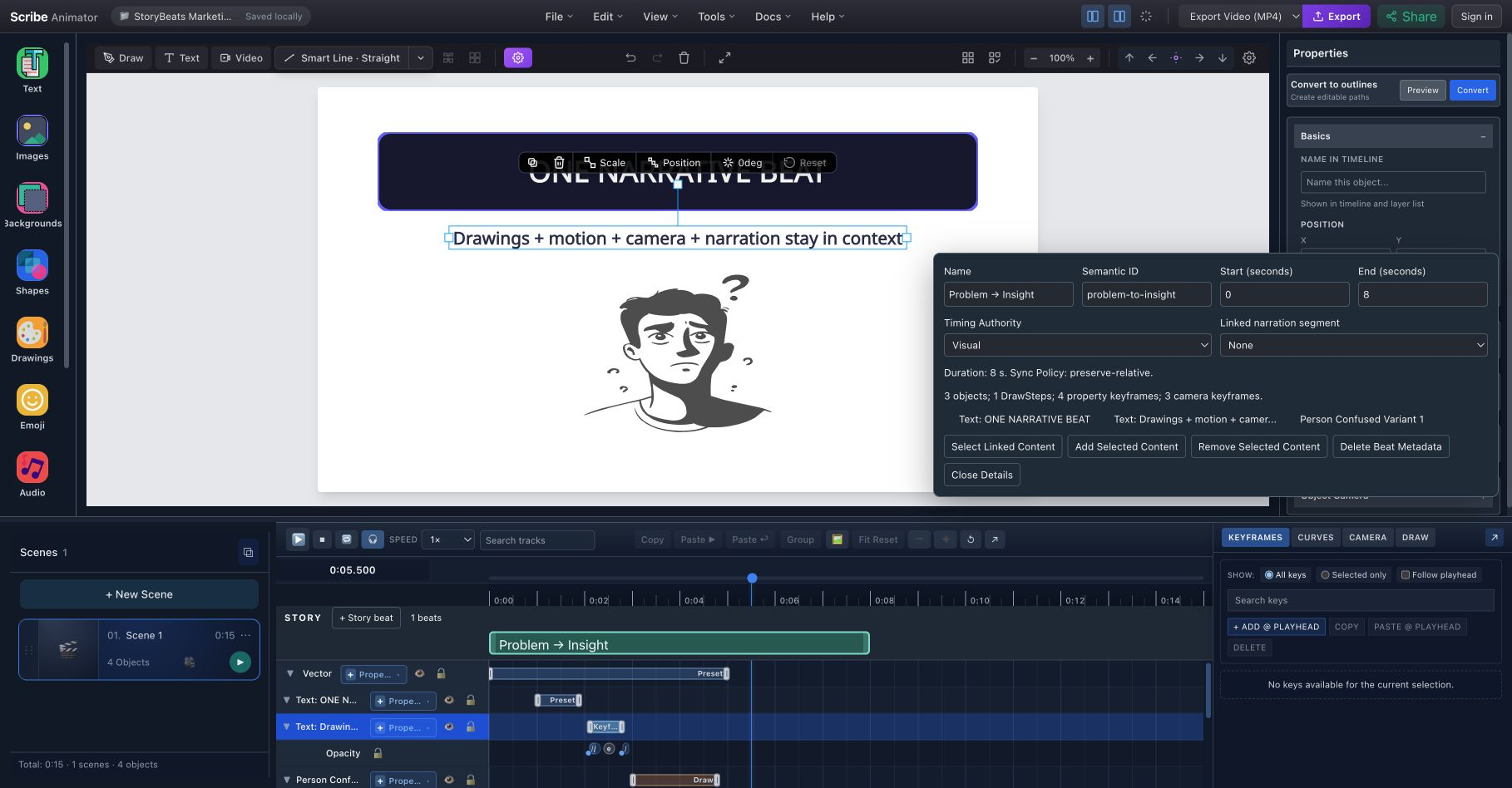
The selected “Problem → Insight” beat makes its range and linked content visible while the scene objects and timeline lanes remain independently editable.
This is not a physical group on the canvas. Objects can still move and style normally. Nor does the StoryBeat store the animation values, drawing paths, or camera poses. It records narrative membership and timing ownership so Scribe can plan a safe operation against the real authored data.
The StoryBeats feature overview explains this value for evaluators. The maintained StoryBeats user guide documents every control and conflict.
Translation is different from stretching
When a beat moves, Scribe adds one time delta to the beat and the timing it owns. What should stay intact remains intact: animation duration, easing, tangents, relative property-key spacing, internal camera transitions, Draw Step duration, and intended staggering.
That is a translation, not a compression or time stretch. It preserves the way the explanation was authored while changing where it appears in the scene.
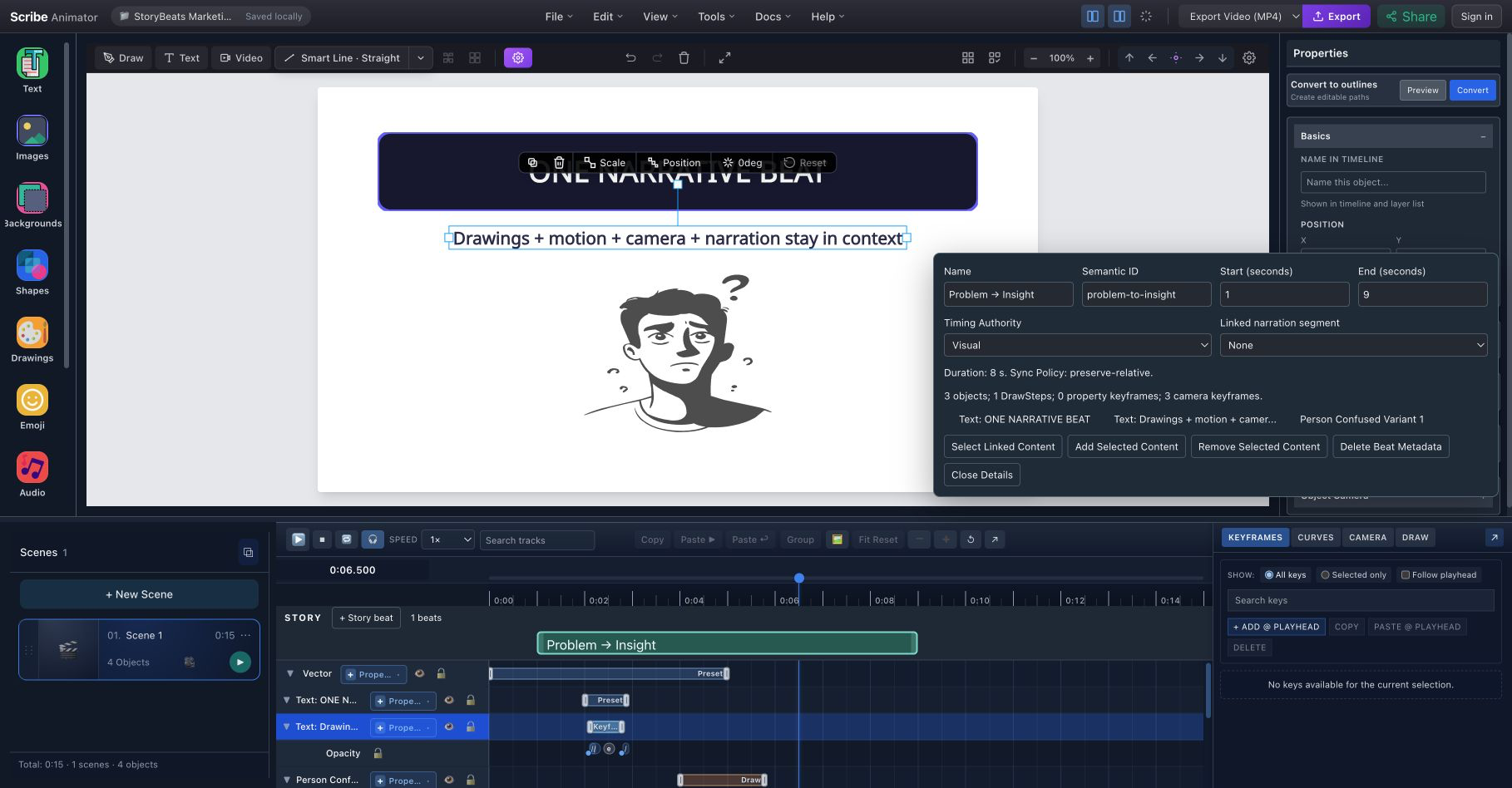
The beat now spans 1–9 seconds. Its related timing moved without turning a carefully paced reveal into faster motion.
Resizing follows the same principle. Extending a visual-led beat can add hold space. Moving its start translates related timing. Shortening it below the required authored duration produces a pacing conflict. Scribe asks the creator to extend the beat or edit the underlying motion deliberately.
Narration can lead, but only explicitly
StoryBeats offer three timing authorities:
- Visual when authored motion defines the pace;
- Audio when a linked narration segment should define the available range;
- Locked when approved timing should reject moves, resizes, and syncs until someone changes the authority.
With Audio authority, Sync to Narration aligns the beat and translates its visual timing. Longer narration can create hold space. Narration that is too short for the authored motion does not silently accelerate it.
This complements Scribe's broader voiceover and synchronization workflow. Direct object-to-audio bindings remain authoritative; StoryBeats reject ambiguous ownership instead of rewriting those bindings behind the creator's back.
Good conflict messages protect creative intent
Some relationships cannot be moved safely without a decision:
- a narration clip shared by several segments must be split or reorganized;
- both endpoints of a changing camera transition must be owned together;
- an active direct audio binding may already own an object's timing; and
- authored motion may not fit inside a requested shorter range.
In each case, the command stops and the authored state remains intact. This is more useful than a “smart” edit that creates a broken camera transition or unexpectedly accelerates a drawing.
The same principle is why deleting a StoryBeat removes only the StoryBeat metadata. The linked scene objects, animation, camera keys, Draw Steps, and narration remain. The organizational layer can be revised without destroying the work it describes.
StoryBeats make semantic editing more precise
Narrative names and explicit membership also give compatible AI agents a safer target than “move whatever looks related.” Through Scribe's WebMCP Site tools, an agent can inspect named beats and perform canonical StoryBeat operations against the visible project. The normal conflict rules still apply.
Read how WebMCP enables AI-assisted editing for that wider story, or use the Site tools quickstart for a practical first edit.
When to create a beat
Do not create one for every object. A beat is useful when several authored elements express the same narrative purpose and are likely to move, resize, sync, or be inspected together. Name the purpose, preview the internal pacing, then add the references that genuinely belong.
For detailed keyframe and curve work, keep the Timeline & Motion guide nearby. For complete camera transitions, see Camera and path following. StoryBeats do not replace either tool; they preserve the relationship between their results and the story the viewer is meant to understand.