AI agent editing with WebMCP Site tools

An AI agent can often describe an edit perfectly: add a new scene, place a heading in the center, bring in a relevant drawing, and animate the entrance. The fragile part is translating that intent into screen coordinates. A button moves, a panel closes, or a responsive layout changes, and click automation no longer means what the agent thought it meant.
WebMCP gives websites a semantic alternative. In Scribe Animator, compatible browser agents can discover typed Site tools that describe editor actions directly. The agent asks Scribe to create a scene or inspect locked objects, not to click an approximate point on the screen.
WebMCP is experimental, and OpenAI currently surfaces it as Site tools where available. Support depends on the compatible client, version, rollout, workspace, browser, and model. This is not a claim that every ChatGPT or browser session can use Scribe tools.
Semantic actions are more durable than screen clicks
Traditional UI automation treats the interface as pixels or a changing DOM. It must rediscover controls, infer state from labels, and hope the same layout survives between runs. Semantic Site tools expose the action and input contract the product already understands.
That difference matters in an animation editor. “Move a StoryBeat three seconds later” is not equivalent to dragging a rectangle by an estimated number of pixels. The product operation must validate timing ownership, preserve authored relationships, join history, and report conflicts. The canonical StoryBeat command already knows those rules; a Site tool lets the agent call it instead of imitating a drag.
The same idea applies to scene creation, text editing, object layout, asset search, animation, camera keys, and project inspection.
The agent edits the project you can see
Scribe does not create a hidden AI-only editor. Agent actions operate on the real project shown in the canvas, scene list, timeline, and inspector. A creator can verify the result in the familiar interface immediately.
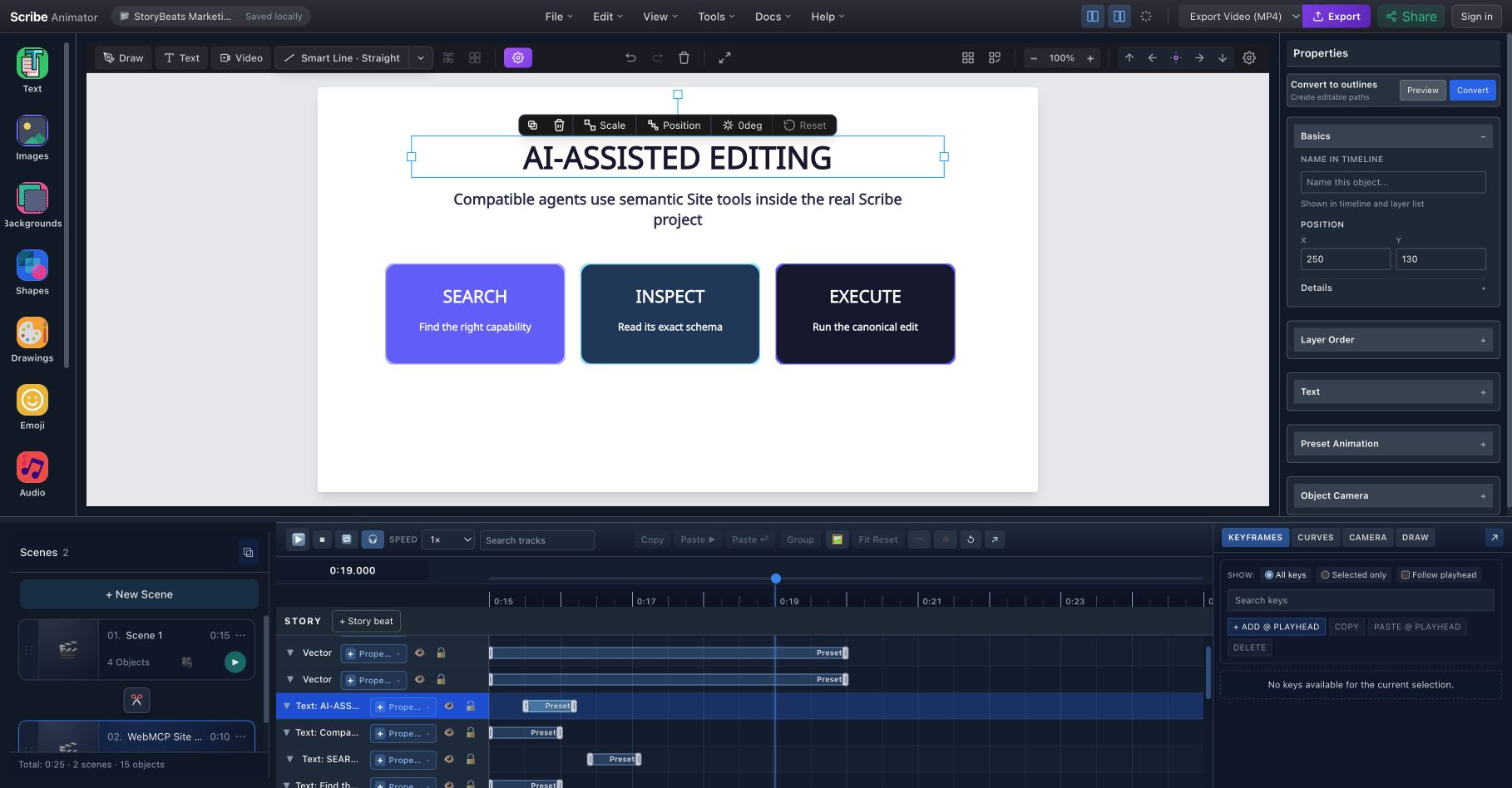
This current-build scene was created through Scribe's Site-tool capability workflow. Search, inspect, and execute describe the broker model used for specialized actions.
The AI-agent editing feature page provides the product overview. The ChatGPT/Codex Site tools quickstart walks through a read-only check, one reversible edit, verification, Undo, and a larger task.
Discovery keeps a large editor understandable
Scribe's current Desktop experience covers many domains: projects, scenes, objects, text, assets, drawing, timeline keys, camera, audio, video, templates, export, and more. Registering every possible operation as an independent browser tool would make the surface noisy and brittle.
Instead, a stable broker lets the agent:
- search the canonical capability catalog for the task;
- inspect the exact schema and current availability; and
- execute the selected capability through Scribe's validated command path.
Natural-language users do not need to type those internal tool names. They can ask, “Find the supported way to add an appropriate drawing to this scene,” and the compatible agent can perform discovery behind the scenes.
The current validated Desktop build reports 41 physical Site tools. That number is useful evidence for the tested build, not the product's central promise; the surface can evolve while the discovery model remains stable.
History and permissions remain product rules
WebMCP does not create a privileged shortcut around Scribe. Normal authentication, project permissions, entitlements, media limits, object locks, and command validation still apply. If the underlying capability records a reversible Scribe edit, normal Undo remains available.
That is important for trust. An agent can propose or perform work, but it must operate under the same project rules as the visible editor. A locked object does not become editable just because the request came through a semantic tool. A plan-limited action does not gain a new entitlement.
The complete WebMCP behavior and security reference documents continuity, same-origin boundaries, sanitized results, and contextual availability.
Protected choices stay human-controlled
Some steps belong to the browser, operating system, or account owner. WebMCP does not bypass them. A person still chooses or approves:
- local files;
- the tab, window, or screen used for recording;
- microphone permission;
- credentials, one-time passwords, and reauthentication;
- purchases and billing approval;
- destructive account confirmations; and
- browser-owned download or share destinations where required.
This boundary connects naturally to step-based Screen Recording. An agent can help prepare the project or continue editing after capture, but the person selects the screen source in the browser's protected chooser.
What useful requests sound like
A Site-tool workflow can begin with ordinary language:
Inspect the current project and list locked objects.
Create a new scene, add a heading, center it and animate its entrance.
Find a drawing that fits this explanation and add it to the scene.
Move this narrative beat three seconds later.
These prompts correspond to current reachable capability domains. They also show a useful progression: inspect first, make a small reversible change, verify it, then request a coordinated task.
For narrative timing, StoryBeats give both people and compatible agents a named unit with explicit membership and conflict behavior. Read why StoryBeats keep narration, camera, drawings, and keys together for the editorial argument.
What Scribe does—and does not—supply
Scribe supplies semantic editor tools and enforces the product's authoring rules. It does not host an LLM for this feature. The compatible client or agent supplies the intelligence and decides how to translate natural language into tool calls.
Nor does WebMCP imply that advertisers or arbitrary websites can access a private project. Scribe's editor tools are same-origin by default, and public share or embed routes do not receive the private editor surface.
Start with a reversible experiment
Use a disposable project or save a checkpoint, open Scribe in a compatible client, confirm that its Site tools are visible, and ask one read-only question. Then request a small edit and verify it on the canvas before asking for a larger workflow.
That sequence keeps AI assistance legible: intention in natural language, validated semantic actions in Scribe, visible results in the real project, and human authority at every protected boundary.