Marketing funnel explained: Awareness to Action
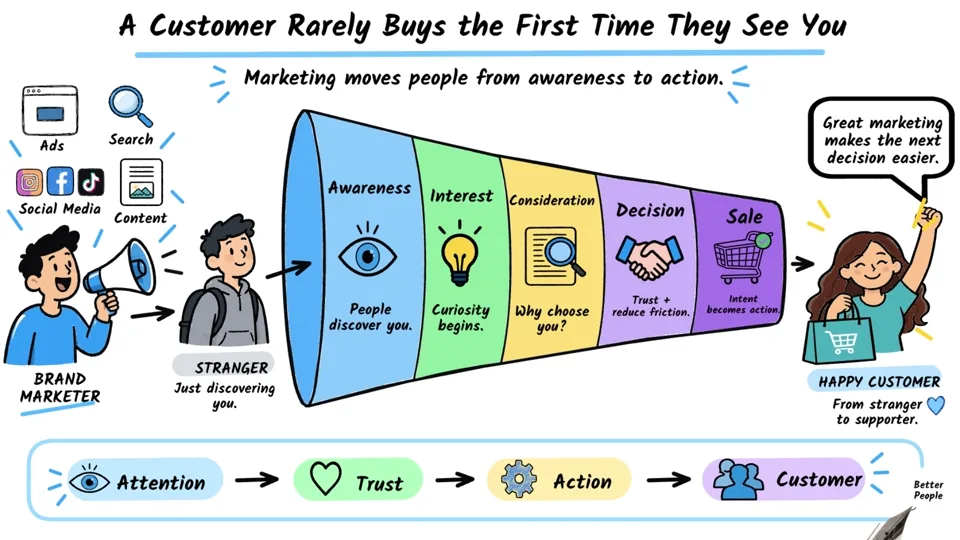
This business infographic follows a potential customer through successive funnel stages. It is also the heaviest public example, so it provides a useful view of how a longer, denser Scribe production is organized. Open the editable package to inspect the scene boundaries and timing rather than treating the final video as one flattened chart.
Project at a glance
Business Infographic · Marketing
- Duration
- 5:11
- Scenes
- 6
- Objects
- 715
- Canvas
- 1672 × 941, 30 authored fps
Techniques: Camera, Narration, Story Beats, Draw Animation, SVG, Smart Lines, Smart Arrows, Multi Scene, Complex Project.
Follow the funnel, scene by scene
The opening “Marketing funnel” scene establishes the overall shape. “Awareness — Help the right people discover you” then asks how people encounter the offer. “Interest — Attention becomes curiosity” narrows the focus to engagement. “Consideration — Why should I choose you?” gives the viewer a comparison stage before “Decision — Reduce friction and build trust.” The final authored scene is “Sale — Intent turns into action.”
Those six names come from the actual package. They distinguish the final conversion moment from the preceding decision stage; the example does not collapse the two into one card. The project contains many editable objects, so scene-by-scene inspection is easier than trying to understand the whole timeline at once.
What to inspect in Scribe Animator
Choose one stage and compare its introductory title with the supporting labels and smart arrows. Pause at a fully composed frame, then step backward to see the draw reveals and connector timing. Move to the next scene and look for continuity in the infographic style, background, and camera framing. Listen to the narration as you follow the global timeline so you can tell whether a visual arrives before, with, or after the spoken point.
For editing guidance, see scenes and templates, timeline and motion, smart lines and arrows, camera moves, and voiceover sync.
Assets used in this project
These 13 curated source visuals are useful for building your own scenes. The asset pack is separate from the complete editable .scribe project, which already contains the animation, objects, audio, and timing.








Download source assets (.zip) 198 KB · SVG
Watch the finished video and open the source
Watch finished video links to the official Marketing Funnel Explained: From Awareness to Action upload. Open editable project highlights the same public project in the editor. Save your current work before choosing Open Project; importing a full example replaces the active workspace after confirmation.
This exact immutable package is also the workload in the Scribe Animator Export Performance Benchmark. The benchmark reports observed export correctness and timings with explicit device and background-tab limitations. Compare it with the other styles in Example Projects.