How APIs connect apps: an editable blueprint explainer
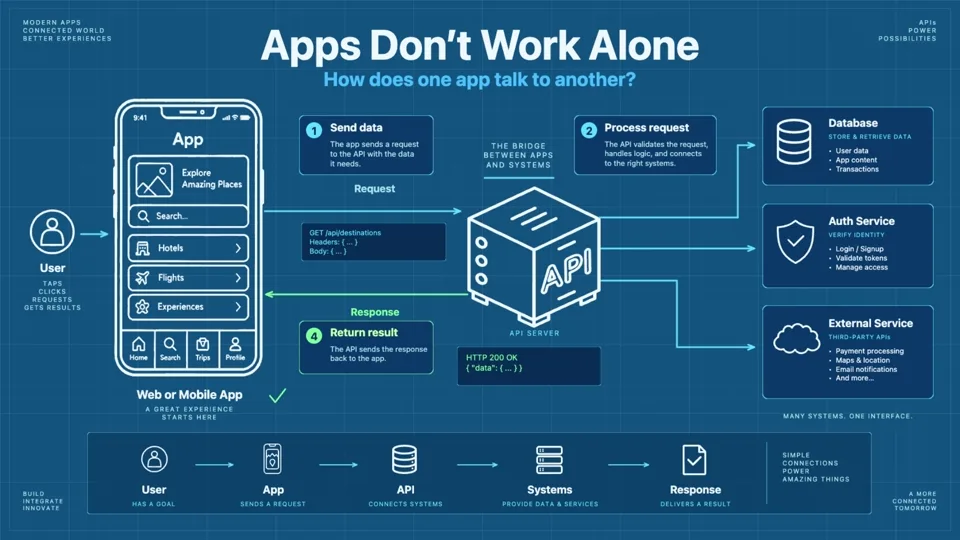
An app often needs data or a service outside itself. This blueprint-style explainer follows a request from a user action through an API and back to an app display. Watching gives you the concept; opening the project lets you inspect how arrows, labels, and camera framing keep the technical flow legible.
Project at a glance
Blueprint · Technology
- Duration
- 4:38
- Scenes
- 5
- Objects
- 549
- Canvas
- 1672 × 941, 30 authored fps
Techniques: Camera, Narration, Story Beats, Draw Animation, SVG, Smart Lines, Smart Arrows, Text Animation, Multi Scene.
Trace the request and response
- Apps Don’t Work Alone introduces the connected system and the basic request → processing → result shape.
- The Request starts with a tap, click, or search. The app packages what it needs and sends an HTTP request, illustrated with a weather query.
- Inside the API expands the server side: receive, validate, process, get data, and prepare a response. Authentication and permissions are part of this diagram.
- The Response returns structured data to the app; the visible example uses a successful HTTP response and weather fields.
- The Big Picture zooms back out to the user, app, API server, and connected systems.
The editable package preserves labels such as /weather and /users /data as text. They are diagram copy, not external asset URLs. This is particularly useful when examining how a technical illustration combines literal endpoint text with actual connector geometry.
What to inspect in Scribe Animator
Scrub scene 2 to see when the user, app, request, and HTTP label enter. In scene 3, follow one arrow from the incoming request to validation and data access. The arrow endpoints matter more than decorative motion: check whether each connector still points to the intended object if you move a block. Scene 4 is a good place to compare narration timing with the response payload and camera frame. Scene 5 shows whether the earlier detail remains understandable in an overview.
Use smart lines and arrows, camera moves, SVG and vector import, text and typography, and voiceover sync for the editing controls.
Assets used in this project
These 12 curated source visuals are useful for building your own scenes. The asset pack is separate from the complete editable .scribe project, which already contains the animation, objects, audio, and timing.








Download source assets (.zip) 44 KB · SVG
Watch the finished video and open the source
Watch finished video opens the official How APIs Connect Apps: From Request to Response upload. Open editable project highlights the corresponding public package in the editor gallery. The source remains editable after opening; the current workspace is replaced only after the normal Open Project action and confirmation.
Return to Example Projects to compare this blueprint treatment with other visual styles.